Settings when using a Graphics block:
All these would go into the Status
qrsize - size of each dot, default (10)
qrbackcolor - leave blank for white (no gradient colors used) or Transparent (gradient colors
used) - Any valid HTML color can be used
qrforecolor - leave blank for black - Any valid HTML color can be used - Ignored if mode is set
to QR
qrerror - Values are L, M, Q, H.
------------------------------------------
Settings when using a PDF block:
All these would go into the Status
qrsize - size of each dot, default (10)
qrbackcolor - leave blank for white (no gradient colors used) or Transparent (gradient colors
used) - Any valid cmyk Color
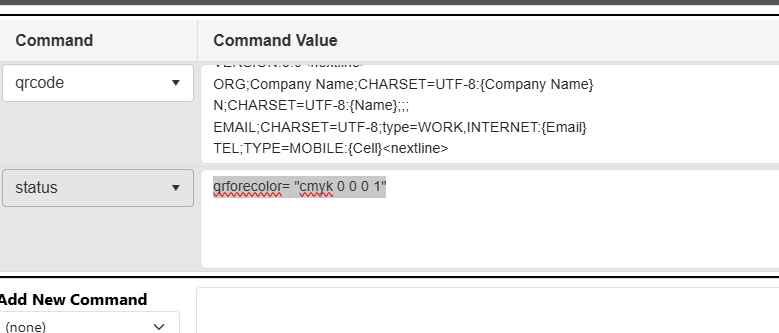
qrforecolor - leave blank for black - Any valid cmyk, rgb or gray color pattern can be used
qrerror - Values are L, M, Q, H.
qrforecolor Examples in a PDF block
spot
qrforecolor= "spot PANTONE 186 C | tint 1 | alt 0 1 1 0"
Please note that the various parts of the color MUST be separated by a pipe character |
Spot name can be any existing or custom name.
cmyk
qrforecolor= "cmyk 0 0.9 0.9 0"
gray
qrforecolor= "gray 0.5" OR "grey 0.5"
Was this article helpful?
That’s Great!
Thank you for your feedback
Sorry! We couldn't be helpful
Thank you for your feedback
Feedback sent
We appreciate your effort and will try to fix the article